Hand exercises for gamers can be simple movement prompts during a pre-match desk reset, but they are not medical treatment or performance training. The practical priorities are a neutral, supported setup, less forceful input, breaks, and changes of activity. Stop if symptoms appear, and seek qualified care for pain, numbness, weakness, or symptoms that persist.

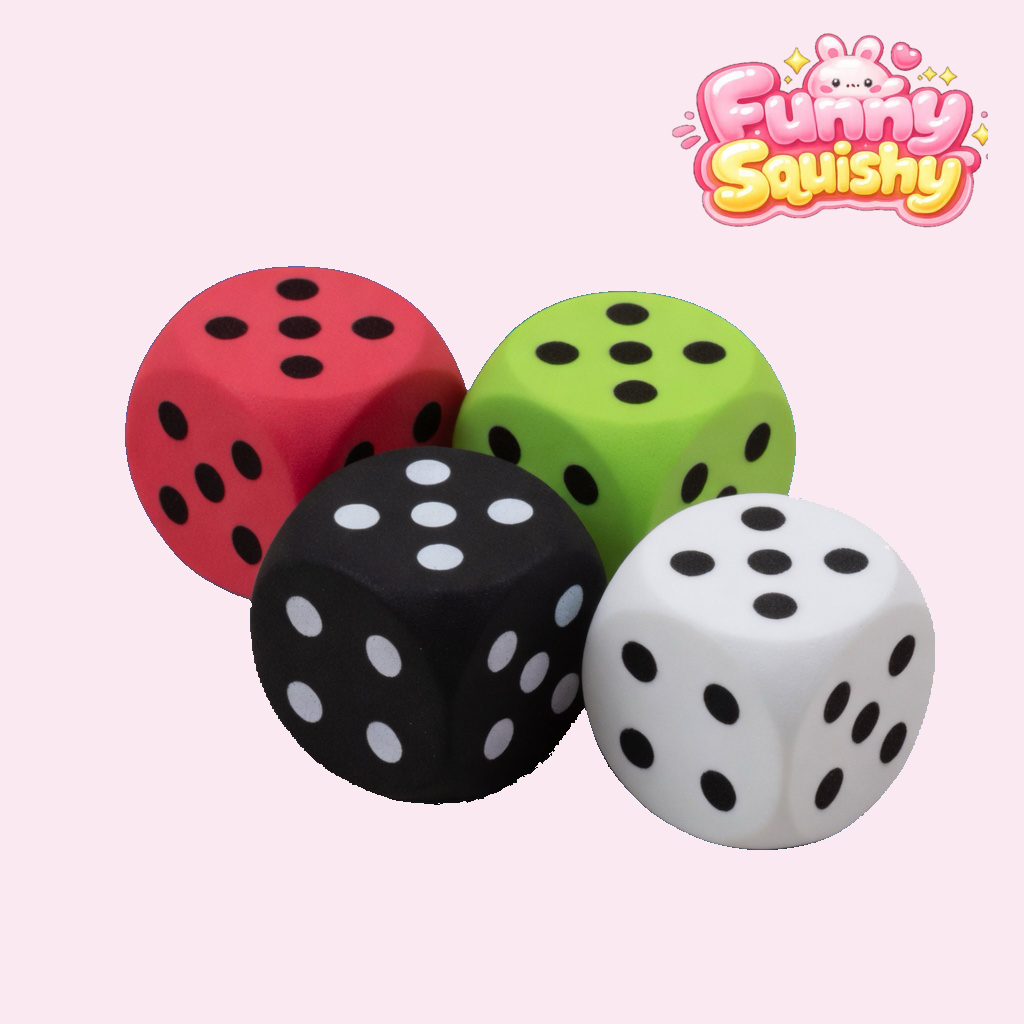
A dice-shaped foam squishy can be an optional desk object; the image does not imply a health or gaming-performance benefit.
What an Esports Warmup Can—and Cannot—Do
Players often search for a quick esports warmup before a ranked session, scrim, or tournament. A brief pause can help you notice a clenched grip, raised shoulders, a bent wrist, or a poorly placed mouse. That makes the reset useful as an ergonomics check. It does not turn a desk toy into exercise equipment, a medical device, or a shortcut to better mechanics.
The “3-minute” label is a convenient name, not an evidence-based dose. There is no universal set of repetitions, holds, or seconds that this article presents as a professional training prescription. Choose easy, comfortable movement and stop rather than pushing through discomfort. A pre-match routine should never delay assessment of symptoms or be treated as a test of how much force your hand can tolerate.
| Common claim | Evidence boundary for this guide |
|---|---|
| “Prevent wrist pain” or “boost APM” | Not claimed. This guide does not establish injury prevention, pain relief, faster inputs, or higher actions per minute. |
| “Top esports physiotherapists prescribe this” | Not claimed. We have no basis for that endorsement, prescription, or professional consensus. |
| “Increase synovial lubrication” | Not claimed. No joint-fluid effect has been established for this desk reset or the featured product. |
| “Increase microcirculation or capillary flow in 60 seconds” | Not claimed. A timed circulation effect is outside the evidence used here. |
| “Warm hands react 18% faster” | Not claimed. This guide does not support that percentage or promise faster reaction time. |
That caution also reflects the FTC Health Products Compliance Guidance: objective health and safety claims, including implied claims created by the overall presentation, need appropriate substantiation. A disclaimer cannot rescue copy that otherwise promises treatment, pain-free play, reaction-speed gains, or injury prevention. The safer and more useful approach is to describe observable setup choices and product facts.
Use NIOSH Risk Factors to Read Your Gaming Setup
NIOSH identifies force, repetition, awkward or static posture, contact stress, and the intensity, frequency, and duration of a task as relevant ergonomic risk factors. Its material is written for work, not esports, so applying it to gaming is a practical analogy rather than a claim that gaming and a specific job are identical. The useful question is not “Which magic drill fixes my hand?” but “Which parts of my setup or session keep adding force, repetition, or an awkward position?” See the agency’s ergonomic risk-factor overview.
Start with what you can observe. Are you squeezing the mouse harder during tense rounds? Is the keyboard so far away that you reach forward? Does the desk edge press into your forearm? Does your wrist stay sharply bent while the rest of the arm remains still? Are you repeating the same input pattern for a long block without changing activity? These observations are more actionable than treating “cold hands” as proof of slow nerve transmission or reduced reaction time.
Neutral posture is a reference, not a rigid pose
NIOSH describes a neutral posture as one in which muscles and joints are resting and relaxed. For a gaming desk, use that idea to reduce extremes: keep the mouse and keyboard close enough that you do not overreach, let the shoulders settle, support the forearms where practical, and avoid holding the wrist at a pronounced angle. Neutral does not mean frozen. Even a comfortable position can become tiring when held for too long, so movement and task variation still matter.
Let the workstation fit the player
Adjust the chair, desk, display, mouse, and keyboard as a system. Feet should have stable support; controls should be reachable without leaning or shrugging; the display should not make you crane your neck; and cables or desk clutter should not force a narrow mouse path. Sensitivity settings and keybinds are personal, but a layout that demands repeated reaching or a constantly tense grip deserves reconsideration.
The NIOSH office-environment guidance emphasizes proper equipment and workstations, avoiding over-reaching and awkward postures, and using short breaks to reduce computer-related discomfort. It does not prescribe one perfect break schedule for every person. For gamer ergonomics, the practical translation is to pause before discomfort escalates, change activity between blocks when possible, and revise the setup if the same problem keeps returning.
A Non-Medical Pre-Match Desk Reset
This sequence is a set of optional cues, not a therapy protocol. It has no fixed count, hold time, target speed, or resistance. Skip any step that feels uncomfortable, and do not use it to judge readiness to play.
- Release the controls. Take both hands off the mouse, keyboard, or controller. Let your grip soften and notice whether your shoulders are lifted or your jaw is clenched.
- Recheck position. Bring the controls within easy reach. Let the forearms rest comfortably and move the wrist away from an extreme bend. Remove pressure from a hard desk edge where practical.
- Use easy, self-selected movement. If it is comfortable, gently open and close the hands, spread and relax the fingers, and move the forearms through an easy range. Do not force a stretch, chase a deeper angle, perform rapid taps for speed, or continue when a movement causes symptoms.
- Change the task. Stand, walk, look away from the display, get water, or do another comfortable activity. The point is variation, not completing a timed athletic warm-up.
- Return with less force. On the next round, check whether you can click, press, or steer without gripping harder than the input requires. Revisit the setup if tension quickly returns.
These hand exercises for gamers are intentionally modest. They are reminders to stop, move, and inspect the desk—not drills for trigger-finger speed, wrist rehabilitation, pain treatment, or APM agility. A pre-match reset may feel like a useful transition into play, but that subjective preference is different from a measured reaction-time benefit.
Where an Optional Squishy Fits
A soft object can serve as a visible cue to take your hands off the controls and change activity. If you choose to handle one, keep the pressure easy and stop if it is uncomfortable. Do not use maximum-force squeezes, rapid repetitions, long isometric holds, or a rebound time as a training target. The product is not presented here as a grip-strength tool, a hand-health treatment, or a way to prevent gaming injuries.
Funny Squishy’s catalog was checked on 2026-08-29. It listed the 4 Color Dice Squishy Pack, Kawaii Foam Stress Relief Dice Cubes as a four-piece, foam, slow-rising set priced at $29.99 USD. The listing had seven gallery images, access to customer support, and a 30-Day Squishfaction Guarantee. Check the live listing for the current price and stock before ordering. The guarantee is a store policy; it is not evidence of durability, material safety, ergonomic benefit, or medical effectiveness.
When to Stop and Get Qualified Help
Stop the reset and stop the activity if you develop pain, numbness, tingling, weakness, loss of coordination, swelling, or another concerning symptom. Do not squeeze through it, use “pain-free” marketing as reassurance, or rely on a desk guide to identify the cause. If symptoms concern you, persist, recur, or affect normal use of the hand or arm, ask a qualified medical professional. If you believe a symptom may be an emergency, seek urgent care.
Advice should also be individualized if you are recovering from an injury, have had surgery, or already have a diagnosed condition. A clinician who can assess you directly is better placed to discuss treatment, rehabilitation, exercise selection, and return to play. This article does not replace that evaluation.
Quick Gamer Ergonomics Checklist
- Controls are close enough to use without over-reaching.
- Wrists are not held at an extreme angle.
- Shoulders can stay relaxed instead of elevated.
- Forearms are not pressed into a sharp desk edge.
- Mouse clicks, key presses, and controller inputs use no more force than needed.
- Long sessions include breaks and changes of activity.
- Symptoms lead to stopping and reassessment, not more repetitions.
FAQ: Hand Exercises for Gamers
Can an esports warmup boost APM or reaction time?
No performance gain is established here. A warmup can be used as a cue to check posture and input force, but this article does not promise higher APM, faster reaction time, better aim, or fewer missed inputs.
Can these steps prevent wrist pain?
No. They are general gamer ergonomics prompts, not an injury-prevention or treatment program. Reducing avoidable force, awkward posture, and unbroken repetition is a sensible setup goal, but it does not guarantee pain-free gaming or rule out an underlying problem.
What if my hands feel cold before a match?
Adjust the room or clothing for comfort and use easy general movement if it feels good. Do not assume that squeezing for 60 seconds increases microcirculation or capillary flow, and do not use an unsupported “18% faster” claim to predict performance. This guide cannot explain coldness paired with color change, pain, numbness, weakness, or persistent symptoms; seek qualified medical advice rather than treating it as a warmup issue.
How often should I do a pre-match reset?
There is no universal prescription in this guide. Use breaks and task changes in a way that fits the session, and respond early to discomfort or rising tension. If you need a personalized schedule or therapeutic exercise plan, ask a qualified healthcare professional rather than relying on fixed online repetitions.
Bottom line: the evidence used here does not establish one “best” esports warmup or promise faster hands. It supports using a brief, non-medical pause to notice force, repetition, posture, workstation fit, and the need for a break. Keep the movement easy, treat a squishy as optional, and let symptoms—not a countdown—decide when play should stop.
Halloween Butter Squishies 7-Piece Set — Assorted Slow-Rising Toys
Bloodshot Eyeball Squishy Toy — Bead-Filled Eye Stress Ball
Glitter Ghost Squishy Toy — Bead-Filled Halloween Stress Ball
Purple Ghost Squishy Toy — Glitter Slow-Rising Stress Ball
Halloween Butter Squishy 12-Pack Display Box — Party Favors
Orange Halloween Butter Squishy — Trick-or-Treat Slow-Rising Toy
Gold Pumpkin Skull Squishy — Glitter Halloween Slow-Rising Toy
Kiwi Slushie Squishy Ball — Moldable Fruit Stress Ball